🎁Codes
How to Redeem Codes
Step-by-step guide to redeeming codes in Anime Apocalypse, with troubleshooting tips for common errors.
⏱ 3 min read
Where to Find the Code Box
The redeem code input is in the game's main menu, not in the hub world.
Step-by-Step
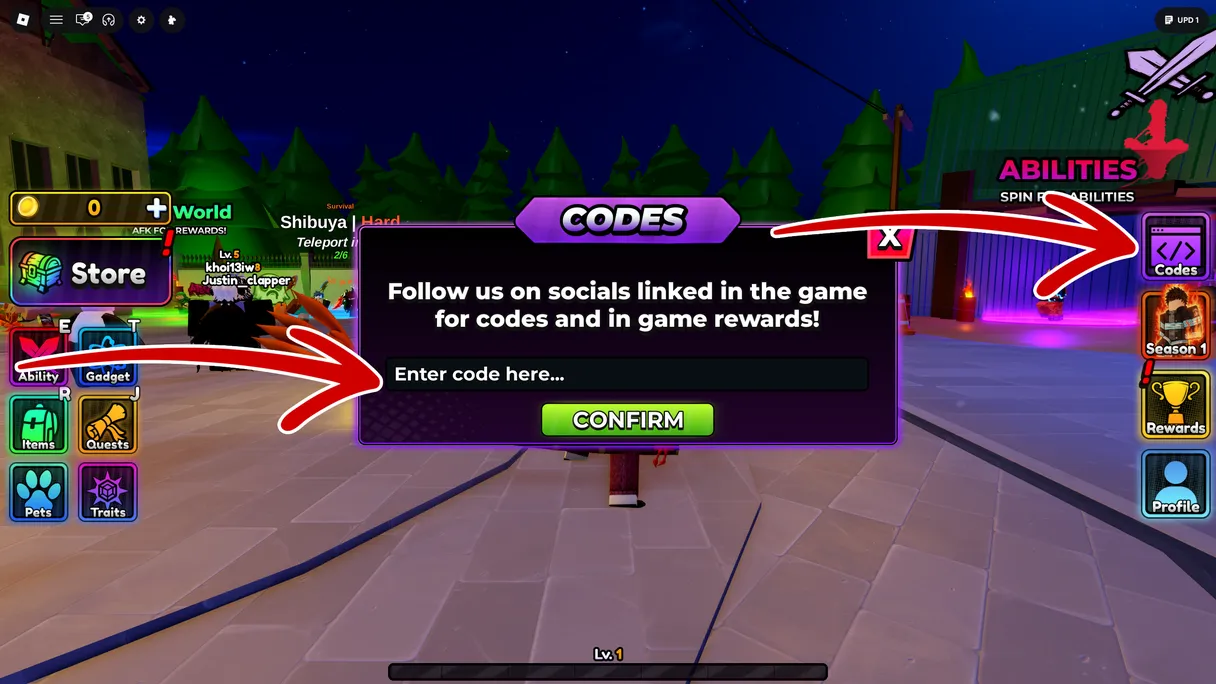
- Launch Anime Apocalypse on Roblox
- Click the Menu button (☰) in the top-left corner of the screen
- Select "Codes" from the menu options
- A text input field will appear — type the code exactly as shown (codes are case-sensitive)
- Press "Redeem" or hit Enter
- Rewards are added to your inventory immediately
Tip: Use the Copy button on our codes page to avoid typos.
Troubleshooting
| Problem | Solution |
|---|---|
| "Invalid code" | Check for typos. Codes are case-sensitive. |
| "Code expired" | The code has passed its expiry date. Check the active codes list. |
| "Already redeemed" | Each code can only be used once per account. |
| Code box missing | Try rejoining the game — the UI sometimes fails to load. |
How Often Are New Codes Released?
Codes are typically released:
- On patch day — Every major update (v0.4.x) comes with 1–2 codes
- Milestone events — When the game hits player count milestones (100K visits, etc.)
- Developer streams — ltsRealJr occasionally drops codes live on stream
We scan for new codes automatically every 2 hours from YouTube, official Discord, and Roblox descriptions. Bookmark this page to never miss one.